> ## Documentation Index
> Fetch the complete documentation index at: https://docs.idmetagroup.com/llms.txt
> Use this file to discover all available pages before exploring further.
# Introduction to the Stateless Verification API
> Run verifications directly without creating or maintaining a Trust Validation or Trust Flow.
The Stateless Verification API lets you call a verification endpoint directly and receive the result in the same response. You do not create a Trust Validation, do not pass a `trustValidationId` or `trustFlowId`, and do not call **Finalize Trust Validation**.
Use this model when you only need the outcome of a specific verification and manage your own workflow outside IDmeta.
## Authentication
To call IDmeta APIs from your application or from tools like Postman, you need an API token associated with your account.
### Getting an API token
1. **Log in** to the IDmeta system (dashboard).
2. **Open your profile**: click your profile avatar/name to go to the profile page.
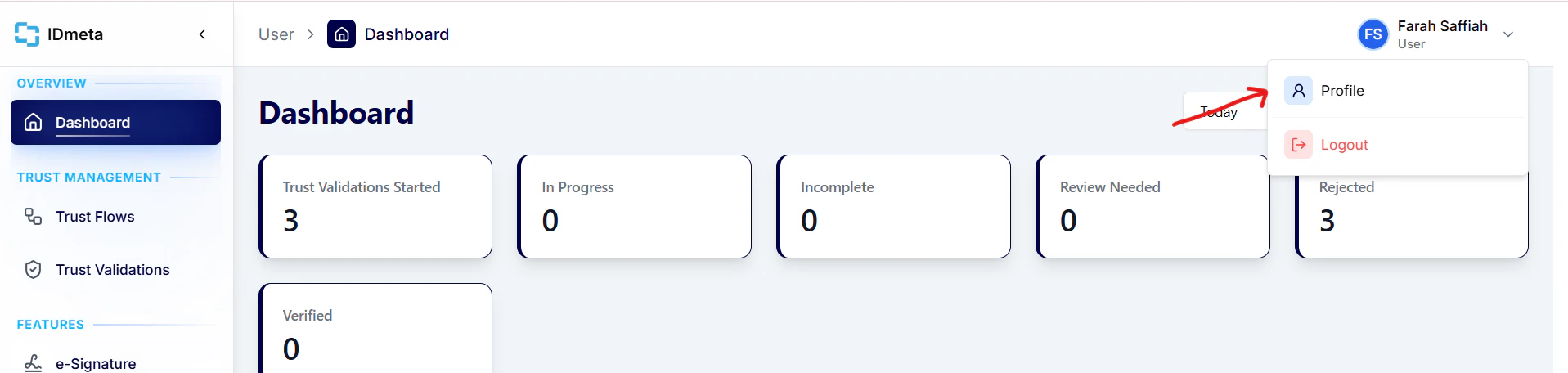 3. In the **Settings** tab, open **API Tokens**.
4. Click **Create token** to generate a new API token.
3. In the **Settings** tab, open **API Tokens**.
4. Click **Create token** to generate a new API token.
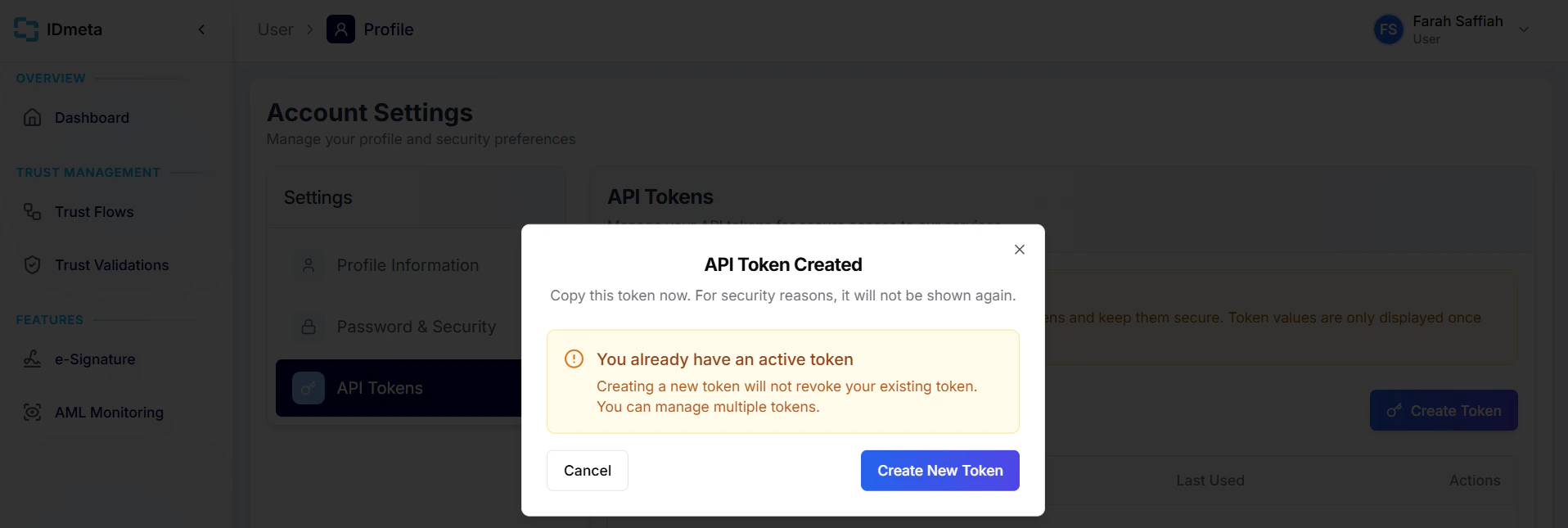 5. Copy the token and store it securely. Treat it like a password.
Use this token as a Bearer token in the `Authorization` header when making requests.
## How the Stateless API works
Each verification is a single request/response cycle:
1. **Send the required verification data** to the relevant endpoint as the JSON request body.
2. **The API runs the verification** against the configured data source.
3. **The response contains the verification result** — there is no separate step to poll or finalize.
```
Request → Verification → Result
```
## Stateless vs Trust Flow
The Trust Flow API is a stateful, multi-step lifecycle. The Stateless Verification API is a direct, independent request → result model.
**Trust Flow API**
1. **Create Trust Validation** — returns a `trustValidationId`
2. **Perform verification(s)** — each step uses that `trustValidationId`
3. **Finalize Trust Validation** — combines results into an overall status
**Stateless Verification API**
1. **Send verification request** — submit the required fields for one verification type
2. **Receive verification result** — the outcome is returned in the same response
| | Trust Flow API | Stateless Verification API |
| ----------------------- | -------------------------------------------- | ------------------------------------------------------- |
| `trustValidationId` | Required | Not required |
| `trustFlowId` | Required | Not required |
| Create / Finalize steps | Yes | No |
| Overall combined status | Yes | No — per-request result only |
| Best for | Multi-step KYC with a single overall outcome | Single verifications where you manage your own workflow |
**Stateless** describes the verification flow from your integration's perspective: you do not maintain a Trust Validation session between requests. It does not mean IDmeta performs no logging, temporary processing, or infrastructure-level handling internally.
## No Trust Validation required
Stateless Verification API endpoints do not use the Trust Validation lifecycle:
* No **Create Trust Validation** call
* No `trustValidationId`
* No `trustFlowId`
* No **Finalize Trust Validation** call
Send the verification input directly to the endpoint you need.
5. Copy the token and store it securely. Treat it like a password.
Use this token as a Bearer token in the `Authorization` header when making requests.
## How the Stateless API works
Each verification is a single request/response cycle:
1. **Send the required verification data** to the relevant endpoint as the JSON request body.
2. **The API runs the verification** against the configured data source.
3. **The response contains the verification result** — there is no separate step to poll or finalize.
```
Request → Verification → Result
```
## Stateless vs Trust Flow
The Trust Flow API is a stateful, multi-step lifecycle. The Stateless Verification API is a direct, independent request → result model.
**Trust Flow API**
1. **Create Trust Validation** — returns a `trustValidationId`
2. **Perform verification(s)** — each step uses that `trustValidationId`
3. **Finalize Trust Validation** — combines results into an overall status
**Stateless Verification API**
1. **Send verification request** — submit the required fields for one verification type
2. **Receive verification result** — the outcome is returned in the same response
| | Trust Flow API | Stateless Verification API |
| ----------------------- | -------------------------------------------- | ------------------------------------------------------- |
| `trustValidationId` | Required | Not required |
| `trustFlowId` | Required | Not required |
| Create / Finalize steps | Yes | No |
| Overall combined status | Yes | No — per-request result only |
| Best for | Multi-step KYC with a single overall outcome | Single verifications where you manage your own workflow |
**Stateless** describes the verification flow from your integration's perspective: you do not maintain a Trust Validation session between requests. It does not mean IDmeta performs no logging, temporary processing, or infrastructure-level handling internally.
## No Trust Validation required
Stateless Verification API endpoints do not use the Trust Validation lifecycle:
* No **Create Trust Validation** call
* No `trustValidationId`
* No `trustFlowId`
* No **Finalize Trust Validation** call
Send the verification input directly to the endpoint you need.